What is n8n queue mode?
If you’ve been using n8n for a while, you know that “magic moment” when your first complex automation finally runs perfectly. But as you start adding more workflows—more webhooks, bigger loops, and heavier data processing you might notice something frustrating. The dashboard starts to lag. The UI freezes. Sometimes, your executions even get “stuck” or fail during busy hours.
This happens because, by default, n8n operates in Standard Mode.
Think of Standard Mode like a tiny coffee shop where one person does everything: they take the order, brew the coffee, and clean the tables. It works great for a few customers, but the moment a tour bus pulls up, the whole system collapses.
Queue Mode is the solution to that “tour bus” problem. It’s how you transform your n8n setup from a single-person operation into a high-performance factory. At SNBD Host, we’ve seen users experience a 10x performance boost simply by making this switch.
In this post, we’re going to break down exactly what Queue Mode is, why it makes your automations bulletproof, and how you can deploy it in one click without touching a single line of complex code.
How Queue Mode Works
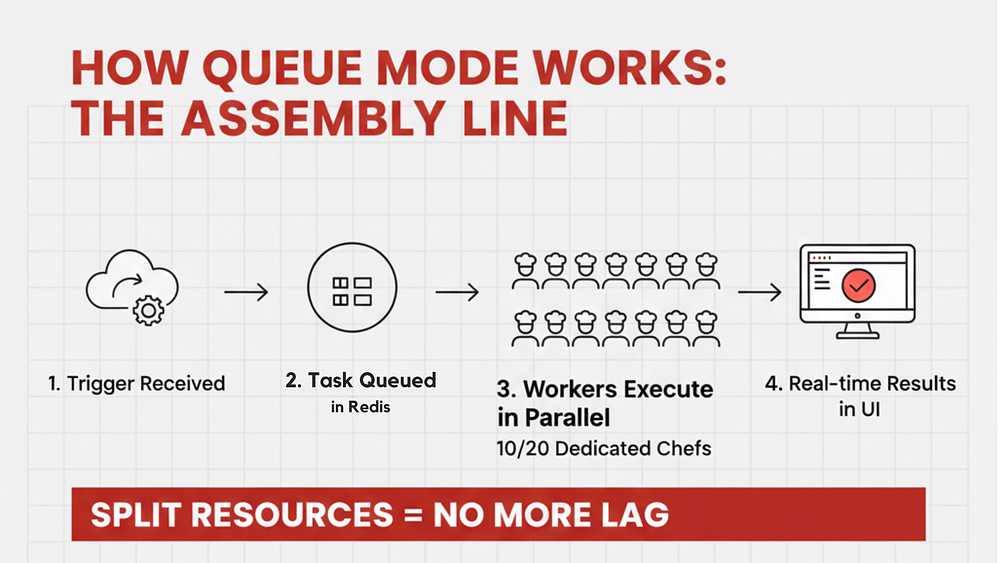
If Standard Mode is a one-person coffee shop, Queue Mode is a professional, high-output bakery. Instead of one person trying to do everything at once, the work is split up among specialists.
To make this happen, n8n introduces three specific components that work together behind the scenes:
The Main Node (The Manager)
In Standard Mode, the Manager is also the chef and the dishwasher. This is why your dashboard lags so much. The manager is too busy cooking to talk to you. In Queue Mode, the Main Node is dedicated only to you and the UI. It handles the editor and the scheduling. Because it is not doing the cooking anymore, your dashboard stays smooth, snappy, and responsive.
Redis (The Order Spike)
In a busy bakery, you need a place to put order tickets so the chefs know what to cook next. Redis acts as this Order Spike. When a webhook hits your server, the Main Node quickly writes a note in Redis and says, “Hey, someone needs to run this workflow.” This happens in milliseconds, ensuring no data is ever dropped, even during a traffic spike.
The Workers (The Team of Chefs)
This is where the real power lies. Instead of one person struggling, you have a dedicated team of Workers whose only job is to grab tasks from Redis and execute them.
- In our 6G Package, you get a team of 10 Workers.
- In our 8G Package, you get a massive team of 20 Workers.
Why this fixes your Lag
Because the resources are split, your Worker nodes can be working at 100% capacity on a massive data migration while your Main Node (the Dashboard) sits at 0% usage. This leaves it perfectly smooth for you to continue building new workflows. You get the best of both worlds: extreme power in the back, and a silky smooth experience in the front.
The 10x Performance Uplift (Turning Speed into Growth)
Now that you have a “Bakery” with 10 or 20 chefs, what does that actually mean for your business? At SNBD Host, we have measured a minimum of 10x performance increase when moving from Standard Mode to our Queue Mode packages.
This is not just a technical stat. It is a complete change in how your automations behave.
Parallel Execution Power
In Standard Mode, if you have 10 webhooks hit at once, they often process one by one. This creates a “bottleneck” where the last person in line has to wait.
With Queue Mode, our 6G package (10 Workers) and 8G package (20 Workers) allow you to run those tasks simultaneously. Instead of a 50 second wait for 10 tasks, they all finish in the time it takes to run just one.
No More Dashboard Lag
Because we use Split Resources, the “thinking” power used for your workflows is separated from the “viewing” power used for your dashboard. Even if your 20 Workers are processing a massive 10,000 row database sync, your dashboard remains fast and usable. You can continue building your next big project without the screen freezing or the “Connection Lost” errors that plague Standard Mode users.
Comparing the SNBD Queue Mode Packages
We have designed these tiers to handle the specific needs of intermediate and power users who are ready to scale.
| Feature | n8n 6G Package | n8n 8G Package |
|---|---|---|
| Worker Count | 10 Dedicated Workers | 20 Dedicated Workers |
| Performance | 10x Faster than Standard | Maximum Enterprise Throughput |
| Best For | Scaling Business Workflows | AI Agents & Heavy Data Processing |
| Trial Offer | 1 Month FREE | 1 Month FREE |
Try the Power for Free
We know that seeing is believing. That is why we are offering a 1-month free trial use coupon “queue” on both our 6G and 8G n8n Queue Mode packages.
Enterprise Power with One Click Simplicity
You might be thinking that setting up a system with a Main Node, Redis, and 20 Workers sounds like a job for a DevOps engineer. Normally, you would be right. Setting this up manually usually involves complex Docker configurations, server networking, and hours of troubleshooting.
The One Click Revolution
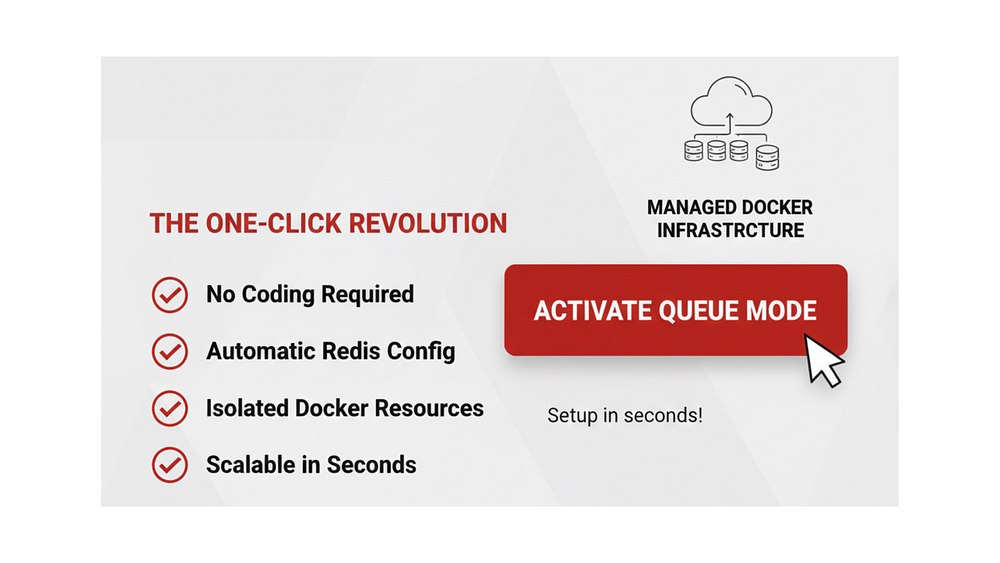
We have packaged this advanced Queue Mode architecture into a One Click Deployment. Whether you choose the 10-worker 6G plan or the 20-worker 8G plan, our system handles the heavy lifting for you.
- No Coding Required: You do not need to write Docker Compose files or manage terminal commands.
- Automatic Scaling: Our platform automatically configures the connections between your Workers and Redis.
- Ready in Seconds: Your high-performance environment is provisioned and ready to go faster than you can make a cup of coffee.
Managed Docker Infrastructure
By using Docker as our core engine, we ensure that your resources are isolated and protected. This means the power you pay for is dedicated strictly to your n8n instance. You get the stability of an enterprise-grade setup with the ease of use of a basic hosting plan.
From “Intermediate” to “Pro” Overnight
This is the fastest way to move from a hobbyist setup to a production-ready environment. You get all the benefits of the 10x performance boost and the lag-free dashboard without needing to learn the “under the hood” mechanics of server management.
How to Get Started (The “Queue” Shortcut)
At SNBD Host, we want to make high-performance automation accessible to everyone. You do not need a DevOps team to stop the dashboard lag and start scaling your business.
We are currently offering a special promotion for users ready to experience the power of our 10 worker and 20 worker architectures.
Your 1-Month Free Trial
You can test drive our n8n 6G or n8n 8G packages for 30 days at zero cost. This gives you plenty of time to move your workflows over, connect your workers, and see the 10x performance boost for yourself.
How to claim your offer:
- Visit our n8n Hosting Store here.
- Select the n8n 6G (10 Workers) or n8n 8G (20 Workers) plan.
- Use the coupon code queue at checkout.
- Launch your instance with our One Click Deployment.