Self-Hosted OpenClaw: The AI Assistant that Acts for You

Transparent Pricing
- Instant Deployment OpenClaw Hosting
- 2 Core High-Performance CPU
- 4GB Dedicated RAM
- 40GB Nvme Storage
- Automated One-Click Deployment
- Node.js 22 & OpenClaw Environment
- Instant Deployment OpenClaw Hosting
- 4 Core High-Performance CPU
- 8GB Dedicated RAM
- 80GB Nvme Storage
- Automated One-Click Deployment
- Node.js 22 & OpenClaw Environment
- Instant Deployment OpenClaw Hosting
- 8 Core High-Performance CPU
- 16GB Dedicated RAM
- 160GB Nvme Storage
- Automated One-Click Deployment
- Node.js 22 & OpenClaw Environment
Please Click Here to view more plans, tailored to your needs.
What is OpenClaw Hosting?
With our OpenClaw Hosting you can host OpenClaw bot in a server and connect LLM into your daily life, office task and much more
0 +
LLMs Supported
Frequently Asked Questions.
What is OpenClaw?
OpenClaw is a free, open-source AI assistant that runs continuously on your own server or hosting environment. It connects to messaging apps like Telegram, WhatsApp, Discord, Slack and can automate tasks, draft content, execute workflows, manage emails, browse the web, and interact with APIs. Unlike typical chatbots, it acts on your behalf.
Do I need an API key to use OpenClaw on SNBD Host?
Yes. To run OpenClaw you need an API key from a language model provider such as OpenAI, Anthropic, or Google Gemini. You enter this key into your OpenClaw setup so it can generate responses and execute commands.
Will my data be secure if I host OpenClaw with SNBD Host?
Absolutely. Your OpenClaw instance runs in an isolated container or virtual environment dedicated to your account. SNBD Host uses encrypted connections and secure storage practices to protect your data and keep it private.
Is technical knowledge required to host OpenClaw?
Not with SNBD Host. Our managed hosting plans include installation, configuration, and ongoing maintenance. You don’t need to manage servers or Docker containers manually — we handle the tech so you can focus on using OpenClaw.
Will my OpenClaw continuously run tasks without interruption?
Yes. With SNBD Host’s robust uptime and reliable servers, your OpenClaw will run persistently — handling scheduled tasks, responding to triggers, and executing workflows 24/7.
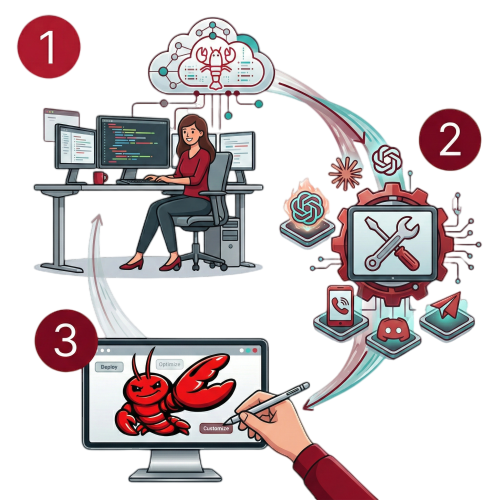
Step 1: Choose Your Plan
Pick the OpenClaw Hosting with enough resources for your usage (see our recommendations above or configure your own server).
Step 2: Complete Setup
Once your server is deployed with OpenClaw installed, connect via SSH and run the onboarding wizard. Add your AI provider API keys, connect your messaging apps, and configure your preferences.
Step 3: Start Using OpenClaw
Launch the terminal interface to interact directly with your assistant, or access the Control UI securely via SSH tunnel. For detailed setup instructions, see our complete OpenClaw guide.