Can You Build a SaaS with n8n? The Definitive Guide to Licensing and Restrictions
1. The “Fair Code” Fear: Can You Actually Build a SaaS on n8n?
There is a recurring ghost story in the builder community that stops founders before they even ship: the idea that n8n is strictly for internal use and that using it for a commercial SaaS will immediately land you a $50,000 “Embed” license bill.
If you’ve spent any time in the forums, you’ve seen the conflicting advice. Some say you’re safe as long as you self-host; others warn that the moment you charge a customer, you’re in breach.
Both are wrong.
The confusion stems from n8n’s Sustainable Use License (SUL). Unlike traditional Open Source (like MIT), n8n uses a “Fair Code” model. This isn’t designed to stop you from building a business. It’s designed to stop other companies from reselling n8n itself as a competing service.
As a founder building my own product, I didn’t want to guess. I went straight to the source and tracked down direct clarifications from Jan Oberhauser, the founder of n8n.
The verdict? You absolutely can use n8n as a SaaS backend. The “illegal” part isn’t making money; it’s how you handle the connection between the user and their data.
In this guide, we’re going to look at the “Whose Credentials” rule the exact litmus test Jan uses to define what is allowed. Whether you are building an AI-powered content tool or a data processing engine, this playbook will show you how to stay 100% compliant while leveraging the fastest workflow engine on the market.
2. The Golden Rule: Whose Credentials Are They?
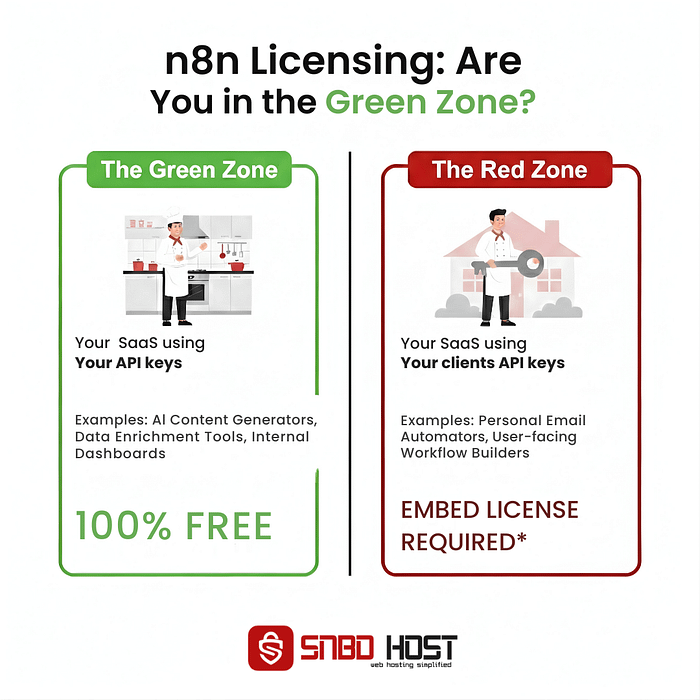
When you dive into the legal text of n8n’s Sustainable Use License (SUL), it can feel like a maze of “internal business purposes” and “derivative works.” But as a founder, you don’t need a law degree to understand it. You just need to ask one question: Whose API keys are sitting inside the n8n nodes?
I like to use a simple “Chef” analogy to explain this, and it’s the best way to visualize your SaaS architecture before you write a single line of code.
The Green Zone (Standard SUL)
In this scenario, n8n is like a Chef working in your restaurant. The Chef uses the restaurant’s own ingredients (your company’s API keys for OpenAI, Anthropic, or SendGrid) to cook a meal. Once the meal is ready, the Chef hands the plate to the waiter (your frontend), who then serves it to the customer.
- The Model: Your SaaS acts as a service provider. You are selling the output of the workflow, not the workflow engine itself.
- The Credentials: n8n only ever touches your keys. It never “reaches out” to touch the user’s personal accounts.
- Verdict: This is 100% allowed under the free, self-hosted license.
The Red Zone (Embed License Required)
Now, imagine the Chef leaves the restaurant, asks the customer for their house keys (the user’s OAuth tokens for Gmail, Slack, or HubSpot), drives to their home, and cooks inside their personal kitchen.
- The Model: You are promising to “manage the user’s data” or “automate their personal accounts” directly within n8n.
- The Credentials: You are passing User A’s token, User B’s token, and User C’s token into n8n nodes at runtime to perform actions on their behalf.
- Verdict: This is considered “Embedding.” To do this legally, you need a commercial Embed license.
The “Sign-In” Myth
I see this mistake a lot: founders think that if a user “Logs in with Google” to their website, they automatically need an Embed license. That is not true. Your frontend authentication has nothing to do with the n8n license. You can have a million users logged into your SaaS; as long as n8n is in the back office using your API keys to process their requests, you are in the Green Zone.
3. The Green Zone: Your “Unfair Advantage” as a Founder
Operating in the Green Zone is a strategic move. By staying here, you aren’t just following n8n’s rules; you are choosing the fastest path to a working product. You avoid the “Oauth Nightmare”—the weeks of coding required to securely manage, refresh, and encrypt thousands of individual user tokens.
Now that you have a compliant architecture, you need a server that doesn’t melt under the pressure of 50 simultaneous webhooks.
The Orchestration Stack: n8n + Supabase + Lovable
Most founders today are moving toward a specific “Golden Stack” that keeps n8n in the Green Zone while offering a world-class user experience:
- Frontend (Lovable / Next.js): Handles the beautiful UI and initial user auth.
- Database (Supabase / PostgreSQL): Acts as the “source of truth” for your app data and user profiles.
- Backend Engine (n8n): The brain that orchestrates the logic, calls your AI models, and cleans the data.
Because n8n sits behind your app, communicating only with your database and your specific API keys, you retain full ownership of your IP. Your “moat” isn’t the code you wrote; it’s the complex workflow logic you built in n8n that competitors can’t easily replicate.
Why the Green Zone Protects Your Margins
The moment you move into the Red Zone (asking for user tokens), your business model changes. You start needing expensive Enterprise/Embed licenses that can eat your profit margins before you’ve even scaled.
By staying in the Green Zone, your primary costs are just your API usage and your hosting. This allows you to stay profitable from your very first paying customer. You are selling the result of your orchestration, and n8n is the high-performance engine that gets you there for a fraction of the cost of a traditional dev team.
4. The Red Zone: When to Stop and Call Sales
As much as we want to stay in the Green Zone, some SaaS products simply cannot exist without crossing into the Red Zone. If your core product value is “giving the user control over their own data,” you are no longer just using n8n as a backend—you are selling automation as a feature.
When the Embedded Model is Actually Good for Business
While the $50k/year price tag for an Embed license sounds terrifying to a solo founder, it is often the smartest long-term move for a B2B SaaS that is scaling. Here is when you should stop looking for workarounds and embrace the official license:
- Workflow Builder as a Feature: If your product allows users to build their own automations inside your app (white-labeling). This turns your SaaS into a “Platform,” making it incredibly “sticky.”
- Native Integrations: If your customers expect 500+ native integrations (Salesforce, HubSpot) out of the box. Building those manually is a suicide mission.
- True Multi-Tenant Isolation: The Embed license provides advanced features for keeping User A’s data and logs completely sandboxed from User B.
If your SaaS is an “AI Agent” that works on your behalf, stay in the Green Zone. But if your SaaS is a “Connectivity Hub” that works on the user’s behalf, the Embed license is a massive investment in your product’s infrastructure that can justify a much higher seat price.
5. The “External Connection” Strategy (Your Professional Workaround)
If you’ve realized that your SaaS idea requires connecting to user accounts, but you aren’t ready to drop $50k on an Embed license, don’t panic. You don’t have to kill your project. You just have to change your architecture.
I call this the “Headless Logic Engine” strategy. It’s the difference between a “No-Code project” and a “Real Product.” Instead of letting n8n handle the dangerous part—managing user house keys—your app handles the security, and n8n handles the brains.
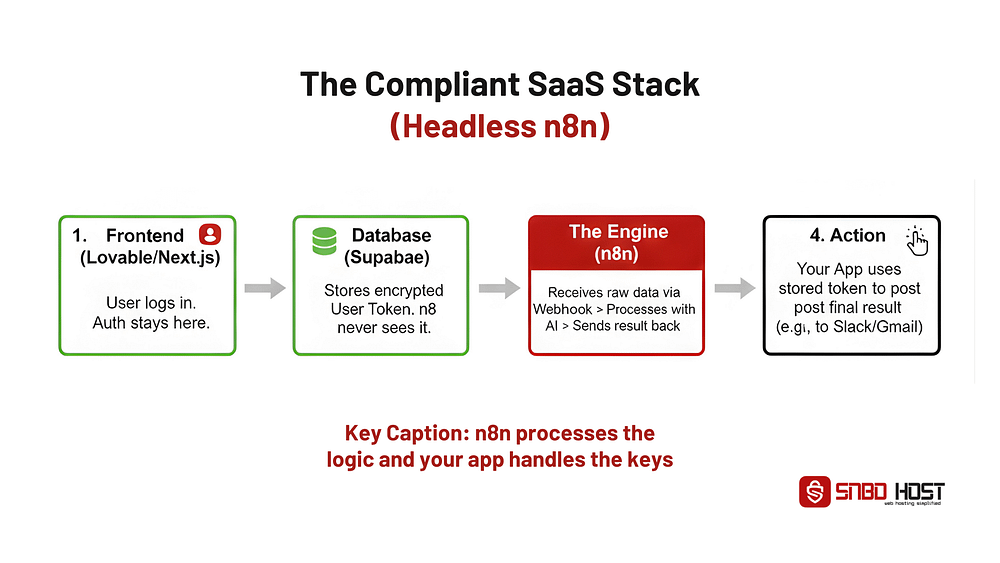
The 4-Step Architecture of Compliance
- The Auth Dance (App Side): Your frontend handles the OAuth process. You store their encrypted
access_tokenin a secure database like Supabase. n8n is never invited to this party. - The Handover (The Proxy): Your app’s backend acts as a filter. When a workflow needs to run, your code fetches the specific data and sends that raw, anonymized data to an n8n webhook.
- The Processing (n8n Side): n8n runs your complex AI chains and logic. Crucially, n8n is just processing text—it has no way to “reach back” into the user account.
- The Execution (App Side): n8n sends the “answer” back to your app. Your code then uses that stored user token to push the final action.
Founder Note: The “Wait and See” Strategy I spent three days trying to find a loophole in the HTTP node before realizing Jan had already called it out in the forums. Don’t waste your time. The “Headless” approach is actually faster to build because you can use modern auth libraries (like NextAuth) that are already optimized for UX.
6. Infrastructure: Scaling the “Engine Room” of Your SaaS
Setting up n8n for a SaaS is fundamentally different from personal use. In a SaaS environment, your backend isn’t just a convenience; it is your product.
Performance at Scale: The “Queue Mode” Necessity
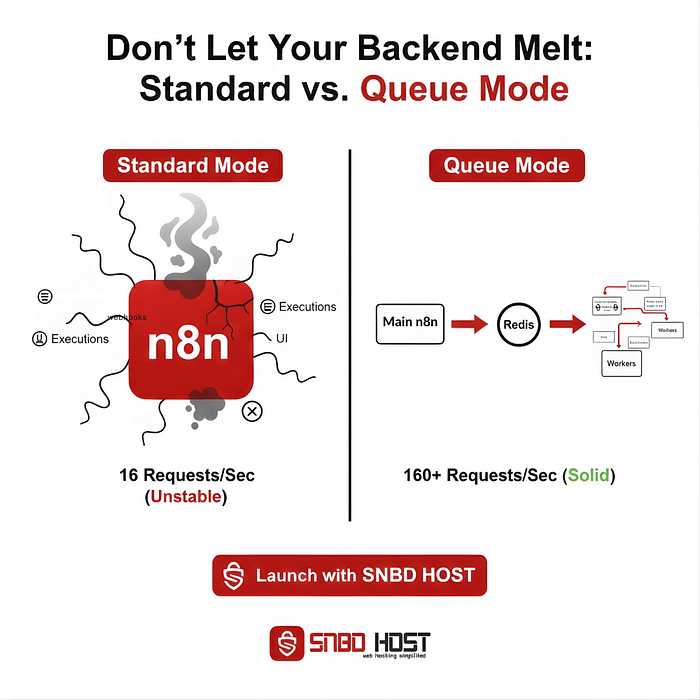
As you move from 10 users to 1,000, your n8n instance will eventually hit a wall. In a standard setup, n8n handles the UI, the webhooks, and the workflow executions all in one process. When 50 users hit your “Generate” button at the same time, the UI will lag, and workflows might time out.
Recent benchmarks show that while a single instance might struggle at 200 concurrent users (peaking at ~16 requests per second), Queue Mode sustained 162 requests per second with zero failures on the same hardware.
- The Pro Move: Always use PostgreSQL. It’s designed for high-frequency writes and multi-user concurrency.
- The Secret Sauce: Use Redis as your message broker. It acts as the “to-do list” for your workers, ensuring no request is ever dropped.
Founder Note: The “Silent Killer” of n8n Instances Storage is the one thing most founders forget. Without pruning, an active SaaS database can grow by 1GB per week, leading to a total crash once the disk hits capacity. Immediately set EXECUTIONS_DATA_PRUNE to true.
Building this “Engine Room” manually takes days of Docker debugging. But what if you could skip the terminal and go straight to shipping?
7. Launch Your SaaS Backend Today (Without the Infrastructure Headache)
Building a SaaS is a race against time. Every hour you spend debugging Docker permissions or configuring Redis clusters is an hour you aren’t spent talking to customers.
That’s why I built a hosting solution specifically for people like us. I wanted to take the technical burden of Section 6 and turn it into a “one-click” reality.
Production-Ready Out of the Box
This isn’t generic shared hosting. It is a high-performance environment pre-configured for exactly the “Headless Logic Engine” model:
- Queue Mode Pre-Configured: We handle the Redis and Worker setup so you can scale horizontally from day one.
- Hardened Security: Your editor is hidden from the public, your database is encrypted, and your webhooks are lightning-fast.
- PostgreSQL as Standard: No SQLite “time bombs” here.
An Exclusive Offer for Fellow Builders
I want to help you get out of the “Configuration Loop” and into the “Building Phase.” Since you’ve made it through this playbook, I’m offering a recurring discount for those ready to commit to their SaaS journey.
The Offer: Get 50% OFF my production-grade n8n hosting.
- The Catch: This applies to Yearly Plans only.
- The Benefit: This is a recurring discount. As long as you stay on the yearly plan, your overhead stays 50% lower.
Coupon Code: SAASBUILDER50
Claim Your Instance Here: Click Here
By taking the infrastructure off your plate, you can focus on the only thing that matters: building a workflow that solves a real problem for your users. Use the code, save the time, and let’s get your SaaS live.