n8n Google Sheets Integration: Easy Automation Guide
Connect n8n to Google Sheets to capture leads, update orders, send alerts, and build reports with less manual work

On this page
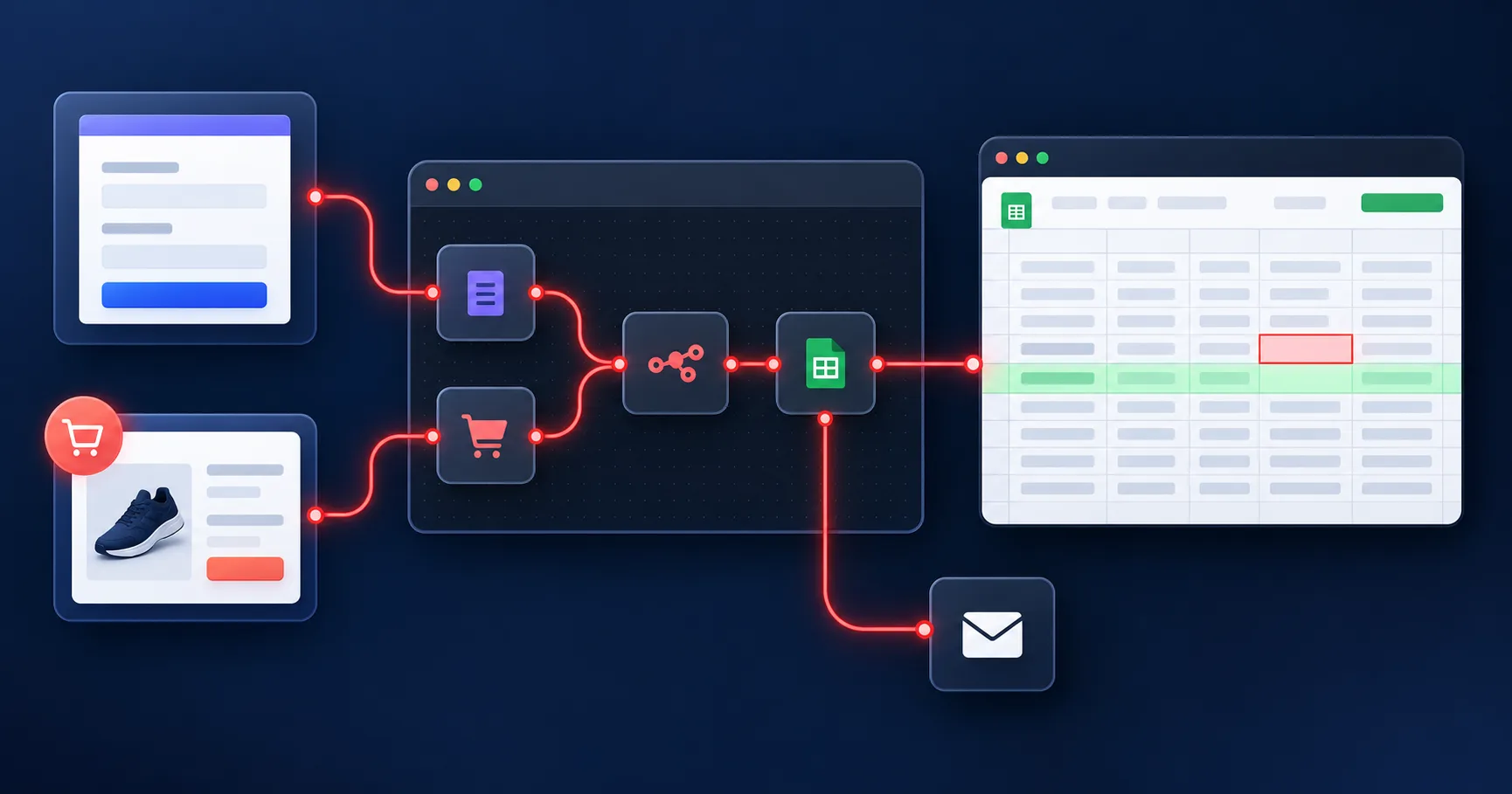
The n8n Google Sheets integration lets you read, append, and update spreadsheet rows as part of an automated workflow. Connect your Google account, choose a spreadsheet, and map incoming data to its columns. This guide explains OAuth2 setup, saving leads and orders, updating existing records, triggering notifications, and creating scheduled reports.
What can n8n do with Google Sheets?#
n8n uses connected steps called nodes. Each node performs a task, such as reading a spreadsheet or sending an email.
The Google Sheets node can read rows, add new entries, and update existing records. The separate Google Sheets Trigger starts a workflow when it detects a supported change.
You can explore the available actions in n8n’s Google Sheets documentation.
1. Prepare your spreadsheet#
Give each column a clear heading, such as:
Order ID
Customer Name
Email
Total
Status
Updated At
Use a unique ID for each order or record. Names alone are poor matches because two customers may share the same name.
Keep headings consistent and avoid merged cells in the data area. Test your first workflow on a copy of the sheet.
2. Connect your Google account#
The setup depends on where you run n8n.
On n8n Cloud, you can use the managed Google sign-in option in the credential settings.
On self-hosted n8n, set up custom OAuth credentials:
Create a project in Google Cloud Console.
Enable the Google Sheets API and Google Drive API.
Configure the OAuth consent screen. If the app is in testing mode, add your Google account as a test user.
Create an OAuth client with the Web application type.
Copy the redirect URL shown in n8n into Google’s authorised redirect URI field.
Enter the Client ID and Client Secret in n8n, then complete Google sign-in.
Use an account with access to the spreadsheet. Writing data requires edit permission.
Follow n8n’s Google OAuth setup guide for the full process. Connecting Sheets does not automatically give every other Google integration access.
3. Save form submissions or orders#
A useful first workflow is:
New submission → Check the fields → Add a Google Sheets row
For example, a website enquiry form could send the customer’s name, email, and message to a Leads sheet.
In the Google Sheets node:
Choose Sheet Within Document.
Select Append Row.
Choose the spreadsheet and sheet tab.
Match each incoming field to the correct column.
Run a test and check the saved row.
You can use the same approach for WooCommerce orders, with columns for order ID, date, total, and payment status.
Google Forms can already save responses to Sheets. Add n8n when you need extra steps, such as checking entries or notifying your team.
4. Update records without adding duplicates#
Use Update Row when a record already exists. Match it using a stable value such as Order ID, then update the fields that changed.
For example:
Delivery update → Match Order ID → Change Status to Delivered
Use Append or Update Row when you want to update a matching record or add it if no match exists. See n8n’s row operation guide.
Keep matching IDs unique and consistent. This helps reduce duplicates when an event is retried, though simultaneous runs may still need extra checks.
5. Send alerts when a row changes#
The Google Sheets Trigger supports:
Row added.
Row updated.
Row added or updated.
Select the spreadsheet, sheet tab, event, and polling schedule. The trigger checks for changes at intervals, so alerts are not always instant.
A simple lead workflow could be:
New lead row → Check required details → Notify the sales team
For an approval workflow, watch for updated rows and continue only when the status is Approved and the record has not been processed. After the action succeeds, save a processed timestamp.
That extra check helps prevent the same approval from running again when another cell changes. Read the Google Sheets Trigger documentation for supported events.
6. Build scheduled reports#
Use a Schedule Trigger to run a report daily, weekly, or monthly.
For example, a daily sales workflow can:
Read the relevant orders.
Filter them by date and payment status.
Calculate order count and sales total.
Save a summary in a reporting sheet.
Email the result to the business owner.
Set the workflow timezone to match your business. For Bangladesh reporting, use Asia/Dhaka so daily totals follow the correct date.
If you archive old rows, confirm the archive copy succeeded before removing anything from the original sheet.
Common problems and simple fixes#
The spreadsheet is missing: Check which Google account is connected and whether it has access. You can also select the document by URL or ID.
Data lands in the wrong columns: Check the header row and field mapping, especially after renaming columns.
Rows appear more than once: Check for repeated source events and use a unique record ID before writing.
Google returns a rate-limit error: Reduce request frequency and retry with increasing delays. Google has both project and per-user quotas, explained in its Sheets API usage limits.
Blank cells cause errors: Add checks or default values before sending data to the next step.
Keep your workflows running#
Test new entries, updates, missing fields, and repeated events before enabling the workflow for regular use. Review failed executions and set up error notifications so problems are easier to catch.
Scheduled workflows need n8n to remain running. Closing a laptop that hosts n8n can stop those automations.
Ready to run your spreadsheet workflows regularly? Explore SNBD HOST’s n8n hosting plans, connect your Google account, and start with one tested automation for leads, orders, or reporting.
Try n8n Free for 1 Month
Deploy your own n8n workflow automation instance in one click. No technical knowledge required. Our team manages everything.
Start Free TrialWritten by
Yeamin Adib
Yeamin Adib is the founder of SNBD Host, building refined, reliable hosting and AI infrastructure, and sharing practical knowledge with creators and businesses from Kamloops, Canada.